1. 背景与痛点
在自动化测试中,Allure 生成的报告通常是分散的文件夹。
- 浏览器限制:直接双击
index.html会因为 CORS 策略一直显示 "Loading..."。 - 管理混乱:报告按时间或 IP 分类(如
192.168.x.x/2025-xx-xx),缺乏统一入口。 - 中文支持:使用 Docker 部署 Nginx (Alpine版) 挂载 NAS 时,中文文件夹经常报 404 或显示乱码。
本文介绍一套极简、低资源占用(适合机顶盒/树莓派)的解决方案。
2. 核心方案架构
- 文件索引:使用 Python 脚本递归扫描目录,生成带层级导航的
index.html。 - Web 服务:使用 Docker 运行
nginx:alpine,通过挂载 NAS 目录展示报告。 - 编码修复:通过注入环境变量解决 Alpine 镜像的中文支持问题。
3. 实现步骤
第一步:编写 Python 目录生成脚本 (build_menu.py)
在报告根目录下(或任意位置,脚本内配置路径)创建此脚本。它会自动识别 Allure 报告目录,并生成美观的导航页,加入排序功能。
import os
import time
import datetime

# ================= 配置区域 =================
# 你的报告根目录路径 (如果是当前目录运行,用 ".")
ROOT_DIR = "."
# 多少小时内的报告标记为 "NEW"
NEW_THRESHOLD_HOURS = 24
# ===========================================

# 记录脚本开始时间
SCRIPT_START_TIME = time.time()

# HTML 模板 (包含 CSS 和 JS)
TEMPLATE = """
<!DOCTYPE html>
<html lang="zh-CN">
<head>
    <meta charset="UTF-8">
    <meta name="viewport" content="width=device-width, initial-scale=1.0">
    <title>Allure 报告中心</title>
    <style>
        :root {{
            --primary-color: #3b82f6;
            --bg-color: #f8fafc;
            --card-bg: #ffffff;
            --text-main: #1e293b;
            --text-sub: #64748b;
            --border-color: #e2e8f0;
        }}
        body {{
            font-family: -apple-system, BlinkMacSystemFont, "Segoe UI", Roboto, "Helvetica Neue", Arial, sans-serif;
            background-color: var(--bg-color);
            color: var(--text-main);
            margin: 0;
            padding: 20px;
            line-height: 1.5;
        }}
        .container {{
            max-width: 1000px;
            margin: 0 auto;
        }}
        /* 头部区域 */
        .header {{
            background: var(--card-bg);
            padding: 20px;
            border-radius: 12px;
            box-shadow: 0 4px 6px -1px rgba(0, 0, 0, 0.05);
            margin-bottom: 20px;
        }}
        .header h1 {{
            margin: 0 0 15px 0;
            font-size: 1.5rem;
            display: flex;
            align-items: center;
            gap: 10px;
        }}
        .stats {{
            font-size: 0.9rem;
            color: var(--text-sub);
            display: flex;
            gap: 15px;
        }}

        /* 控制栏 */
        .controls {{
            display: flex;
            gap: 10px;
            flex-wrap: wrap;
            margin-top: 15px;
        }}
        .search-box {{
            flex: 1;
            min-width: 200px;
            padding: 10px 15px;
            border: 1px solid var(--border-color);
            border-radius: 8px;
            outline: none;
            transition: border-color 0.2s;
        }}
        .search-box:focus {{
            border-color: var(--primary-color);
            box-shadow: 0 0 0 2px rgba(59, 130, 246, 0.1);
        }}
        .btn {{
            padding: 8px 16px;
            background: white;
            border: 1px solid var(--border-color);
            border-radius: 8px;
            cursor: pointer;
            color: var(--text-sub);
            font-weight: 500;
            transition: all 0.2s;
            display: flex;
            align-items: center;
            gap: 5px;
        }}
        .btn:hover {{ background: #f1f5f9; }}
        .btn.active {{
            background: #eff6ff;
            color: var(--primary-color);
            border-color: #bfdbfe;
        }}

        /* 列表区域 */
        .list {{
            display: flex;
            flex-direction: column;
            gap: 10px;
        }}
        .item-card {{
            display: flex;
            justify-content: space-between;
            align-items: center;
            background: var(--card-bg);
            padding: 16px;
            border-radius: 10px;
            border: 1px solid var(--border-color);
            text-decoration: none;
            color: var(--text-main);
            transition: all 0.2s;
            position: relative;
            overflow: hidden;
        }}
        .item-card:hover {{
            transform: translateY(-2px);
            box-shadow: 0 10px 15px -3px rgba(0, 0, 0, 0.05);
            border-color: var(--primary-color);
        }}
        .item-left {{
            display: flex;
            align-items: center;
            gap: 12px;
        }}
        .icon-box {{
            width: 40px;
            height: 40px;
            border-radius: 8px;
            display: flex;
            align-items: center;
            justify-content: center;
            font-size: 1.2rem;
        }}
        .report .icon-box {{ background: #eff6ff; color: #3b82f6; }}
        .folder .icon-box {{ background: #ecfdf5; color: #10b981; }}

        .item-info {{ display: flex; flex-direction: column; }}
        .item-name {{ font-weight: 600; font-size: 1rem; }}
        .item-meta {{ font-size: 0.85rem; color: var(--text-sub); display: flex; align-items: center; gap: 8px; }}

        .badge-new {{
            background-color: #dcfce7;
            color: #166534;
            font-size: 0.75rem;
            padding: 2px 8px;
            border-radius: 9999px;
            font-weight: 600;
        }}

        .back-btn {{
            display: inline-block;
            margin-bottom: 20px;
            color: var(--text-sub);
            text-decoration: none;
            font-weight: 500;
        }}
        .back-btn:hover {{ color: var(--primary-color); }}

        /* 底部 */
        .footer {{
            margin-top: 30px;
            text-align: center;
            font-size: 0.8rem;
            color: #94a3b8;
            border-top: 1px solid var(--border-color);
            padding-top: 20px;
        }}
    </style>
</head>
<body>
    <div class="container">
        {back_button}

        <div class="header">
            <h1>📂 {current_folder}</h1>
            <div class="stats">
                <span>📊 总项目: <strong id="totalCount">0</strong></span>
                <span>📅 生成时间: {gen_date}</span>
            </div>

            <div class="controls">
                <input type="text" id="searchInput" class="search-box" placeholder="🔍 输入关键字搜索..." onkeyup="filterList()">
                <button class="btn active" onclick="sortList('time', 'desc', this)">🕒 时间 ↓</button>
                <button class="btn" onclick="sortList('time', 'asc', this)">🕒 时间 ↑</button>
                <button class="btn" onclick="sortList('name', 'asc', this)">Aa 名称 A-Z</button>
            </div>
        </div>

        <div class="list" id="reportList">
            {links}
        </div>

        <div class="footer">
            页面生成耗时: {gen_duration} 秒 | Powered by AutoReport
        </div>
    </div>

    <script>
        document.addEventListener('DOMContentLoaded', function() {{
            // 默认按时间倒序
            sortList('time', 'desc', document.querySelector('.btn.active'));
            updateCount();
        }});

        function updateCount() {{
            var list = document.getElementById("reportList");
            var visibleItems = 0;
            for (var i = 0; i < list.children.length; i++) {{
                if (list.children[i].style.display !== "none") visibleItems++;
            }}
            document.getElementById("totalCount").innerText = visibleItems;
        }}

        function filterList() {{
            var input = document.getElementById("searchInput");
            var filter = input.value.toUpperCase();
            var list = document.getElementById("reportList");
            var items = list.getElementsByTagName("a");

            for (var i = 0; i < items.length; i++) {{
                var txtValue = items[i].getAttribute("data-name");
                if (txtValue.toUpperCase().indexOf(filter) > -1) {{
                    items[i].style.display = "";
                }} else {{
                    items[i].style.display = "none";
                }}
            }}
            updateCount();
        }}

        function sortList(type, order, btn) {{
            if(btn) {{
                var btns = document.getElementsByClassName("btn");
                for(var i=0; i<btns.length; i++) btns[i].classList.remove("active");
                btn.classList.add("active");
            }}

            var list = document.getElementById("reportList");
            var items = Array.from(list.getElementsByTagName("a"));

            items.sort(function(a, b) {{
                var valA, valB;
                if (type === 'time') {{
                    valA = parseFloat(a.getAttribute("data-time")) || 0;
                    valB = parseFloat(b.getAttribute("data-time")) || 0;
                    return order === 'asc' ? valA - valB : valB - valA;
                }} else {{
                    valA = a.getAttribute("data-name").toLowerCase();
                    valB = b.getAttribute("data-name").toLowerCase();
                    if (valA < valB) return order === 'asc' ? -1 : 1;
                    if (valA > valB) return order === 'asc' ? 1 : -1;
                    return 0;
                }}
            }});

            list.innerHTML = "";
            items.forEach(function(item) {{
                list.appendChild(item);
            }});
        }}
    </script>
</body>
</html>
"""

def get_file_info(path):
    """
    获取文件的时间戳和格式化时间
    返回: (timestamp, formatted_string, is_new)
    """
    try:
        timestamp = os.path.getmtime(path)
        dt = datetime.datetime.fromtimestamp(timestamp)
        fmt_time = dt.strftime("%Y-%m-%d %H:%M:%S")

        # 判断是否为最近生成的 (24小时内)
        is_new = (datetime.datetime.now() - dt).total_seconds() < (NEW_THRESHOLD_HOURS * 3600)

        return timestamp, fmt_time, is_new
    except:
        return 0, "未知时间", False

def is_allure_report(path):
    if not os.path.isdir(path): return False
    return os.path.exists(os.path.join(path, "index.html")) and \
           (os.path.exists(os.path.join(path, "data")) or os.path.exists(os.path.join(path, "widgets")))

def generate_index_recursive(current_path, relative_path=""):
    try:
        items = os.listdir(current_path)
    except PermissionError:
        return

    dirs = [d for d in items if os.path.isdir(os.path.join(current_path, d))]

    # 默认按时间倒序获取列表 (方便 Python 调试,实际顺序由 HTML 中的 JS 控制)
    dirs.sort(key=lambda x: os.path.getmtime(os.path.join(current_path, x)), reverse=True)

    links_html = ""
    has_sub_content = False

    for d in dirs:
        full_path = os.path.join(current_path, d)

        # 获取文件系统时间
        ts, time_str, is_new = get_file_info(full_path)

        # "NEW" 徽章 HTML
        new_badge = '<span class="badge-new">NEW</span>' if is_new else ''

        if is_allure_report(full_path):
            links_html += f'''
            <a class="item-card report" href="./{d}/index.html" target="_blank" data-name="{d}" data-time="{ts}">
                <div class="item-left">
                    <div class="icon-box">📊</div>
                    <div class="item-info">
                        <span class="item-name">{d} {new_badge}</span>
                        <span class="item-meta">📅 {time_str}</span>
                    </div>
                </div>
                <div class="item-arrow">➜</div>
            </a>
            '''
            has_sub_content = True
        else:
            generate_index_recursive(full_path, os.path.join(relative_path, d))
            links_html += f'''
            <a class="item-card folder" href="./{d}/index.html" data-name="{d}" data-time="{ts}">
                <div class="item-left">
                    <div class="icon-box">📁</div>
                    <div class="item-info">
                        <span class="item-name">{d}/</span>
                        <span class="item-meta">📅 更新于: {time_str}</span>
                    </div>
                </div>
                <div class="item-arrow">➜</div>
            </a>
            '''
            has_sub_content = True

    # 生成 HTML
    if not is_allure_report(current_path) and has_sub_content:
        back_btn = ""
        if relative_path != "":
            back_btn = '<a href="../index.html" class="back-btn">⬅ 返回上一级</a>'

        folder_name = "所有报告" if relative_path == "" else relative_path

        # 计算总耗时
        gen_duration = "{:.4f}".format(time.time() - SCRIPT_START_TIME)
        gen_date = datetime.datetime.now().strftime("%Y-%m-%d %H:%M:%S")

        final_html = TEMPLATE.format(
            current_folder=folder_name,
            links=links_html,
            back_button=back_btn,
            gen_duration=gen_duration,
            gen_date=gen_date
        )

        with open(os.path.join(current_path, "index.html"), "w", encoding="utf-8") as f:
            f.write(final_html)
            print(f"✅ 已生成: {os.path.join(relative_path, 'index.html')}")

if __name__ == "__main__":
    print("🚀 开始构建 Allure 导航中心...")
    print("--------------------------------")
    generate_index_recursive(ROOT_DIR)
    print("--------------------------------")
    print(f"🎉 全部完成!总耗时: {time.time() - SCRIPT_START_TIME:.4f} 秒")
第二步:准备 Nginx 配置文件 (nginx.conf)
新建 nginx.conf,用于开启目录浏览功能(防止脚本漏生成的文件夹无法访问)并强制字符集。
server {
    listen 80;
    server_name localhost;

    # 【关键】强制 UTF-8,防止中文文件名乱码
    charset utf-8;

    location / {
        root /usr/share/nginx/html;
        index index.html index.htm;

        # 开启目录索引 (万一没有 index.html 也能列出文件)
        autoindex on;
        autoindex_exact_size off;
        autoindex_localtime on;
    }
}
第三步:Docker Compose 部署 (docker-compose.yml)
这是针对 Armbian 机顶盒优化的配置。
- 关键点1:使用
nginx:alpine极度省资源(内存 < 10MB)。 - 关键点2:通过
environment强制注入语言包,解决 Alpine 默认不支持中文的问题。
version: '3'

services:
  allure-report:
    image: nginx:alpine
    container_name: nginx
    restart: always
    ports:
      - "8081:80"  # 访问端口
    volumes:
      # 1. 挂载报告目录 (根据实际路径修改)
      - /mnt/nas_data/share/report:/usr/share/nginx/html:ro
      # 2. 挂载配置文件
      - /home/yys/nginx/nginx.conf:/etc/nginx/conf.d/default.conf:ro

    # 【核心】解决 Alpine 中文乱码/404 问题的关键配置
    environment:
      - LANG=C.UTF-8
      - LC_ALL=C.UTF-8

    # 限制日志大小,保护机顶盒存储
    logging:
      driver: "json-file"
      options:
        max-size: "10m"
        max-file: "3"
4. 部署运行
-
挂载 NAS (前提): 确保宿主机 (
/etc/fstab) 挂载时包含iocharset=utf8参数,确保宿主机ls能看到中文。 -
生成导航: 在报告目录下运行 Python 脚本:
python3 build_menu.py -
启动服务: 在
docker-compose.yml所在目录运行:docker-compose up -d -
访问: 打开浏览器访问
http://192.168.31.xx:8081。你将看到一个清晰的目录结构,点击任意中文文件夹或报告,均可秒开,无白屏,无乱码。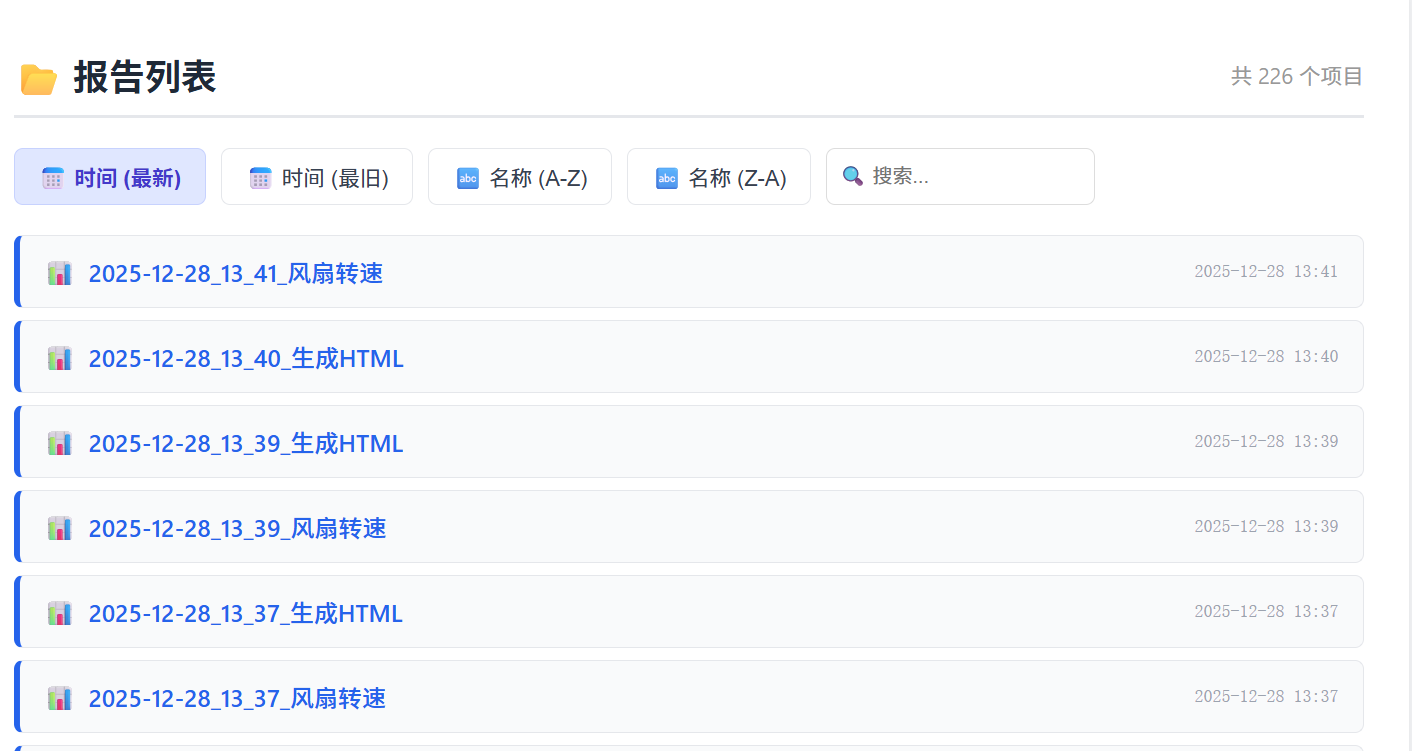
💡 维护小贴士
- 更新报告:每次有新测试报告生成后,只需重新运行一次
python3 build_menu.py即可,Docker 容器不需要重启,网页刷新即可看到最新内容。 - 浏览器缓存:如果发现文件名改了但网页没变,请使用
Ctrl + F5强制刷新。
评论区(1 条)
发表评论⏳ 加载编辑器…
主题真有赛博风格那味